

Two requests reached our litigation-support group in the same week. Marketing wanted short animated explainers for the firm’s client newsletter: how e-filing works, what happens after a contract is signed. A trial team wanted to know whether an AI video model could animate a simple floor-plan diagram for a mediation presentation, to show a forklift’s route through a warehouse instead of pointing at a static slide.
Both requests deserved a test, not an opinion. I spent a day generating clips with a current text-and-image-to-video model, measuring what it got right, how long it took and what it cost, and checking what the files themselves disclose about how they were made. This is a practitioner’s account, not legal advice. Whether any particular clip can be shown to a court, a mediator or a jury is a question for counsel and the tribunal, and nothing below answers it.
The setup
I used gemini-omni-1.2-flash, a video model that accepts a text prompt, reference images, or a first and last frame, and returns 24 fps MP4 clips with sound. Most clips were 5 seconds at 360p, the cheapest tier, to keep the test inexpensive; I ran three at 720p and one 10-second clip to see what more resolution buys. Image inputs must be public HTTPS URLs, so I uploaded my own diagrams through the provider’s upload endpoint first. A data URI was rejected with a clear error message.
A request looks like this:
POST {API_BASE}/v1/videos/generations
Authorization: Bearer YOUR_KEY
Content-Type: application/json
{
“model”: “gemini-omni-1.2-flash”,
“prompt”: “Locked-off camera, flat diagram. The yellow FORKLIFT square slides along the red dashed PATH A from its start position to the end position below DOCK 2. Nothing else in the diagram changes. Quiet room tone.”,
“aspect_ratio”: “16:9”,
“resolution”: “360p”,
“duration”: 5,
“first_frame_image”: “https://…/dock.png”,
“last_frame_image”: “https://…/dock_end.png”
}
GET {API_BASE}/v1/tasks/{task_id}
All diagrams, names and events are invented. I did not generate any people. For each clip I sampled six evenly spaced frames, ran OCR on them, and compared each frame against the prompt and, where there was one, the source diagram.
Test 1: Newsletter explainers from text alone
I wrote four prompts in plain motion-graphics language: a document dropping into a folder with a check mark, a balance scale receiving two weights, a fountain pen signing a contract with no hand holding it, and a 10-second filing-to-courthouse sequence at 720p.
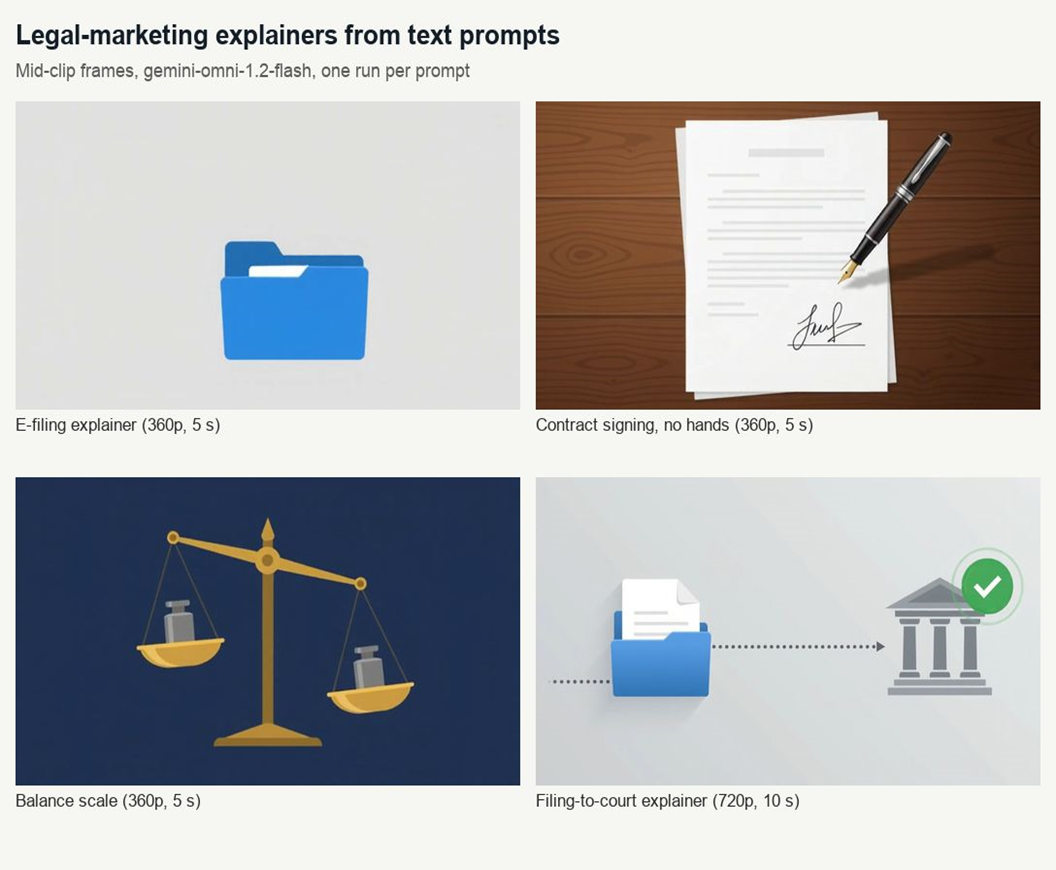
Mid-clip frames from the four text-only explainers.
All four got the main subject right and looked clean enough for a newsletter. The pen signed on the line without a hand. The 10-second clip skipped one step: the document was already inside the folder rather than sliding in. The balance scale showed the problem that matters most for anything a court might see. Its weights appeared, vanished at 1.5 seconds and came back, and the beam tipped before the second weight landed.
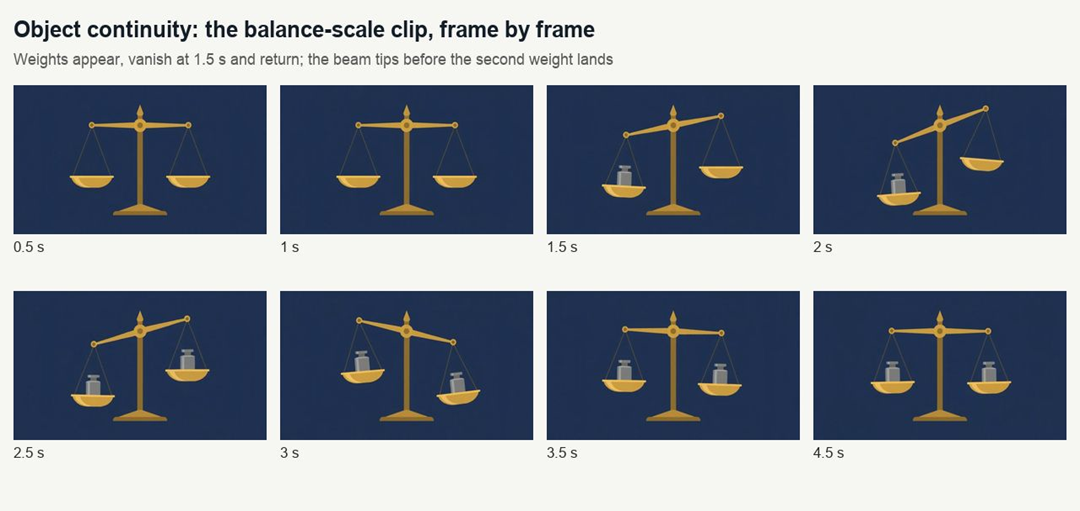
Object continuity breaks in the balance-scale clip.
For marketing, that glitch is cosmetic. In a demonstrative, objects that appear and disappear would invite exactly the cross-examination nobody wants.
Test 2: Animating a floor-plan diagram from a first frame
This was the test the trial team cared about. I drew a simple labelled warehouse plan (three docks, a pallet zone, a rack aisle, a dashed PATH A and a forklift marker) and gave it to the model as the opening frame. The prompt told it to move the forklift along PATH A, stop under DOCK 2, and change nothing else.
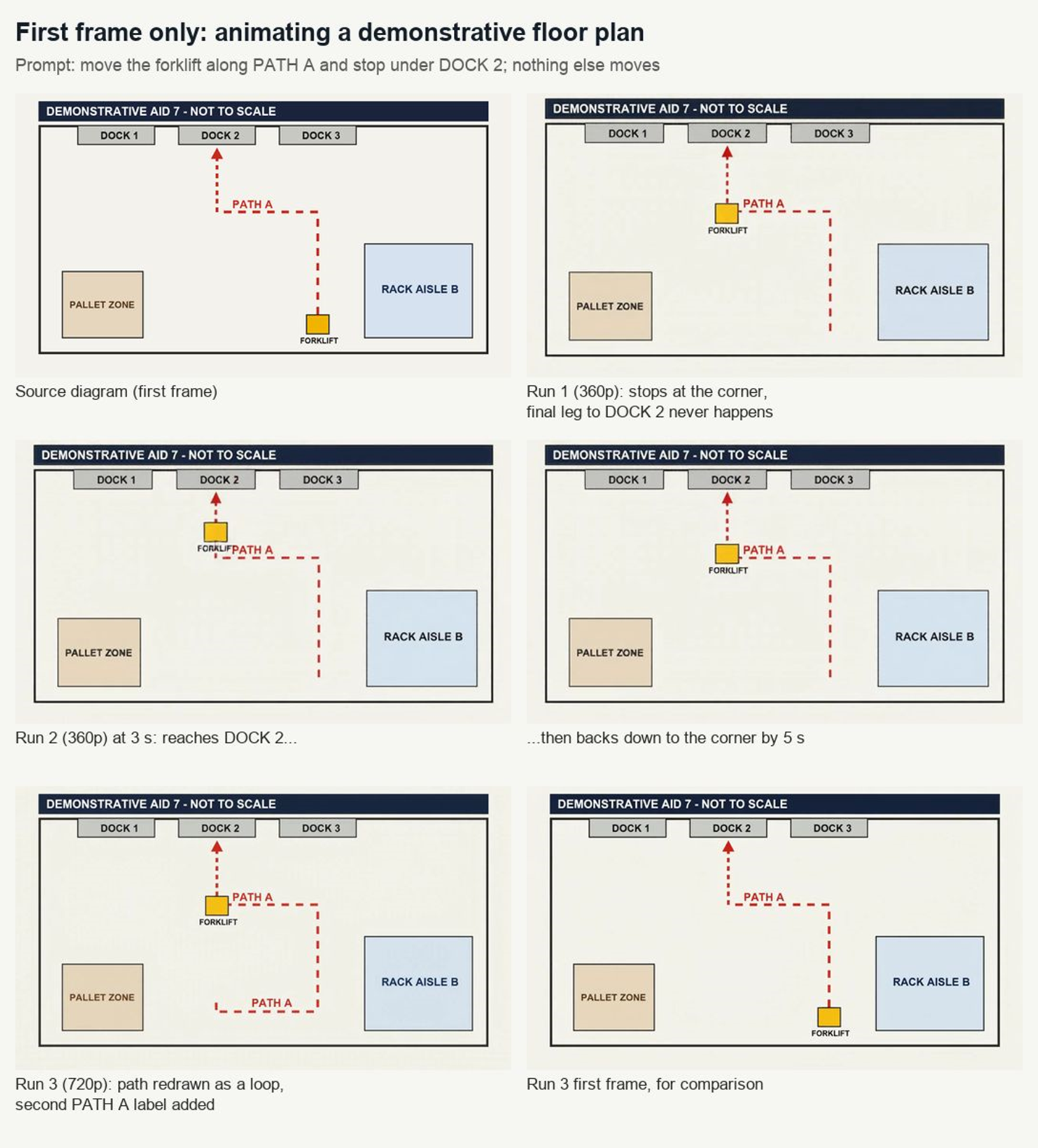
Three runs with the same prompt and the same first frame.
None of the three runs did what the prompt asked. Run 1 stopped at the second corner and never made the final leg to DOCK 2. Run 2 reached DOCK 2 at about three seconds, then backed down to the corner. Run 3, at 720p, redrew the path itself into a loop and added a second “PATH A” label. The surrounding diagram held up well. OCR found the title, all three dock labels, PALLET ZONE and RACK AISLE B in every sampled frame, and on average under 1% of pixels in the static regions changed between the first and last frame. The trouble was the part that carries the meaning: the route.
Test 3: Pinning the ending with a last frame
The model also accepts a last frame, so I drew a second version of the plan with the forklift already under DOCK 2 and supplied both. This is the only mode in which the result was predictable.
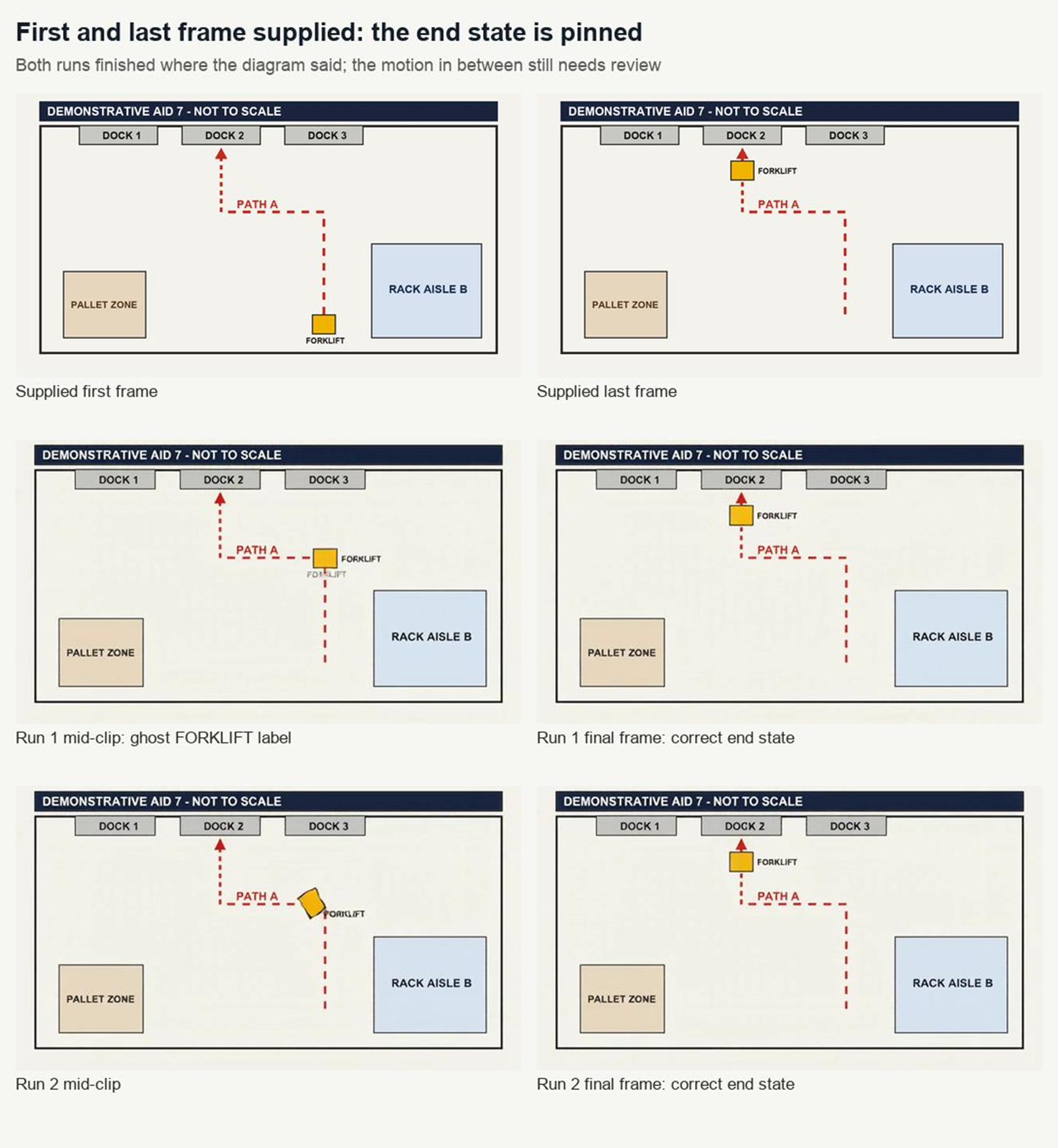
With both frames supplied, both runs ended in the correct position.
Both runs ended in the correct position, and the static regions were essentially untouched (0.1% of pixels or less changed). The motion in between still needs a careful look. Run 1 briefly showed a ghosted second FORKLIFT label at the corner. If a team uses this at all, the honest way to describe it is “an animated transition between two diagrams the team prepared”. The model only fills in the movement between them.
Test 4: A contract timeline
A timeline is the most common graphic in our presentations, so I animated one: four dated events (MAR 3 offer sent, MAR 17 counter-offer, APR 2 signed, MAY 30 delivery due) with a prompt to pulse each dot in order. I ran it twice at 360p and once at 720p.
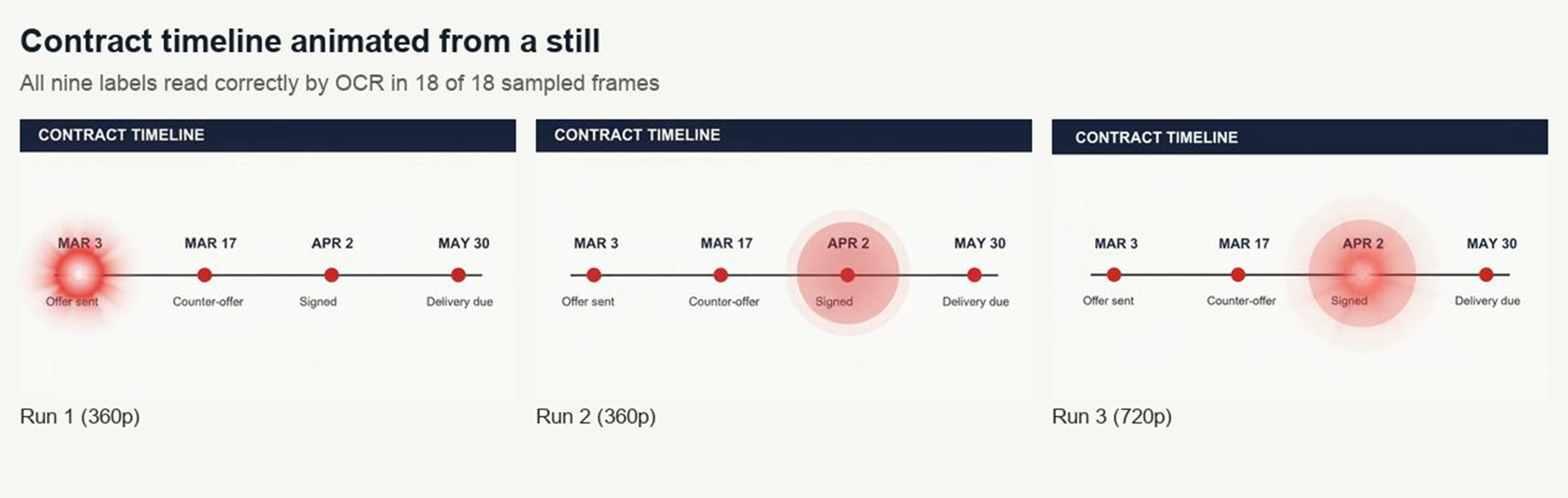
Every date and label survived in all three runs.
This was the cleanest result of the day. OCR read all nine text elements correctly in 18 of 18 sampled frames, and the dots lit in order. When the motion is a simple highlight and the text is large, the model leaves the facts alone.
Test 5: A generated disclosure card
I also asked for a plain title card reading ILLUSTRATIVE ONLY – NOT EVIDENCE, with no reference image, three times. All three runs matched that wording exactly in all six sampled frames.
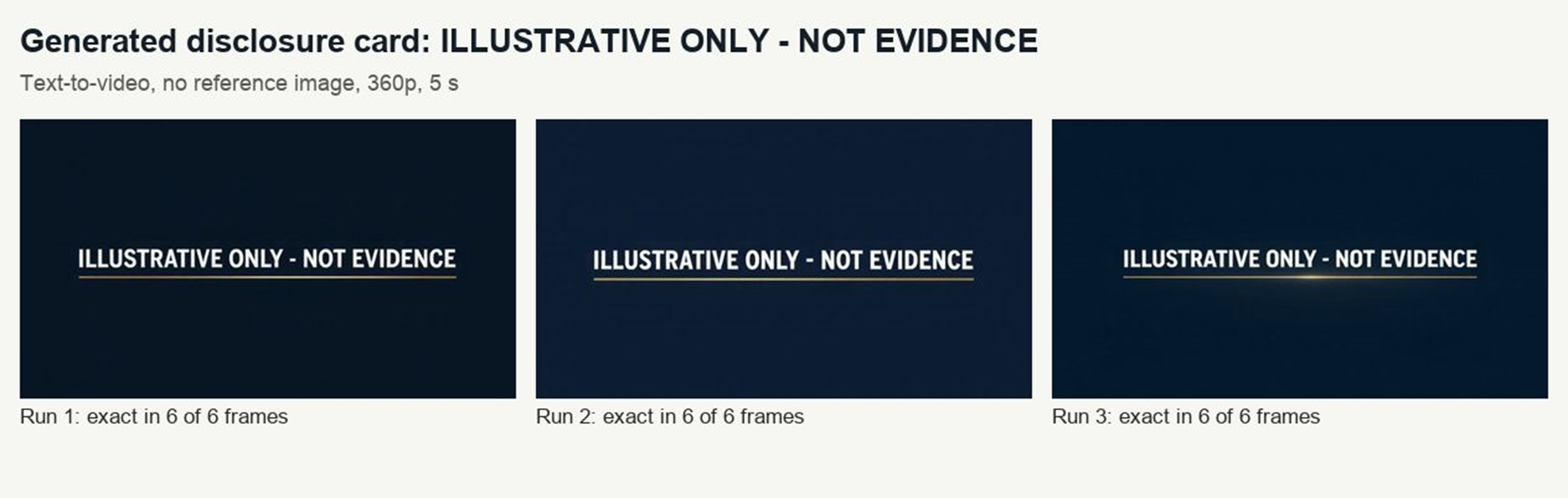
Three runs, exact text in every sampled frame.
Time and cost
A finished 5-second clip usually came back in 26 to 38 seconds; one took 176. A 5-second 360p clip was billed between $0.093 and $0.098, a 5-second 720p clip $0.28, and the 10-second 720p clip $0.56. Those charges were slightly below the per-second list prices on the Gemini Omni 1.2 Flash API page, which also notes that the final charge depends on the output. The whole test set of 15 clips cost $2.24. Money is not the constraint. Review time is: each demonstrative-style clip took me longer to check frame by frame than it took to generate.
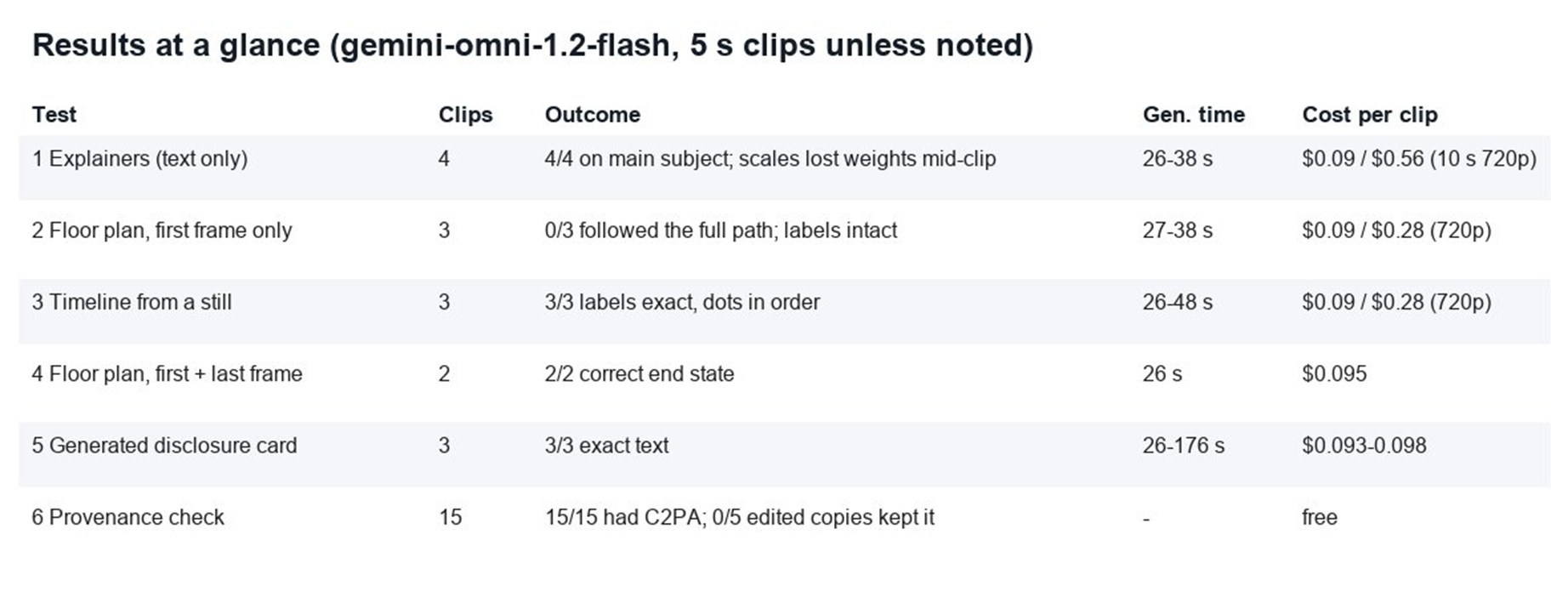
Summary of the measured tests.
Compliance: provenance, disclosure, likeness
Provenance is in the file, until someone edits it. I read every delivered clip with the open-source c2pa-python library. All 15 carried a valid C2PA Content Credentials manifest, signed with the model provider’s certificate, that declares the content as produced by a trained algorithmic model. The model’s documentation also says every output carries an invisible watermark; I had no detector to confirm that, so I can’t verify it. Then I ran the edits a production team would make anyway. A byte-for-byte copy kept the manifest. A remux, a 3-second trim, a re-encode, a downscale and a burned-in label overlay each removed it.
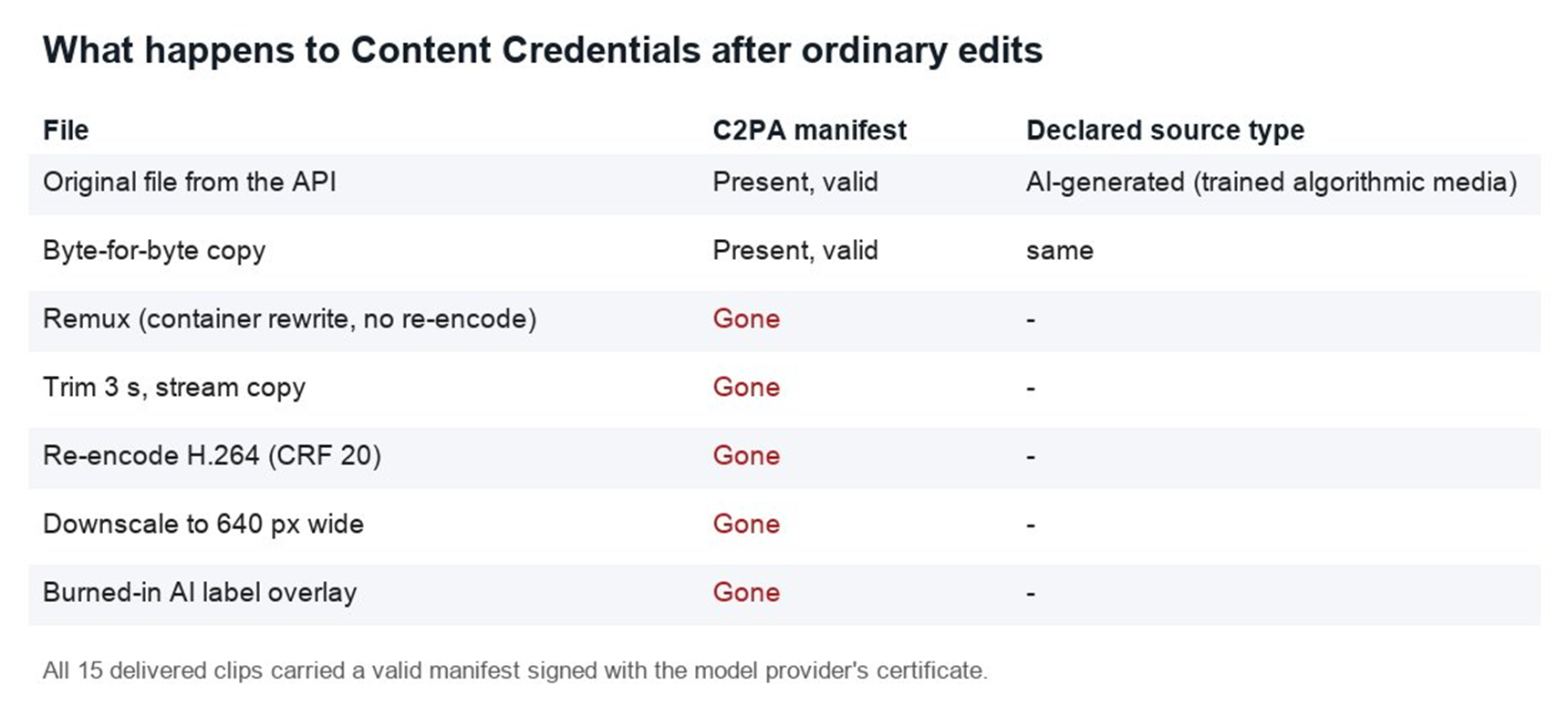
Five ordinary edits, five lost manifests.
The practical lesson: archive the untouched original file with its task ID, prompt, input images and date. That file is your provenance record. Every edited version needs its own disclosure.
Disclosure on screen, not just in a cover email. Because the metadata disappears on export, we now burn a visible label into every generated clip, start a sequence with a card like the one in Test 5, and say plainly in the accompanying materials which elements are generated. Whatever disclosure rules apply in a given forum, they are for counsel to identify. The point here is that the file will not disclose itself once it has been edited.
Likeness and consent. I generated no people, and our internal rule is that we won’t generate real clients, witnesses, parties or recognisable locations. Lifelike people raise consent and right-of-publicity questions, and a “recreation” with a human figure invites the audience to treat it as what happened.
Not evidence of anything. Every clip here shows what a prompt and a diagram produced, not what happened in a warehouse. The model reversed a route and redrew a path while keeping every label crisp, and those are exactly the errors a viewer won’t catch. The defensible use is narrow: illustrative motion between diagrams the team prepared and verified, labelled as illustration, with the original files kept.
Where we landed
For the newsletter, generated explainers are cheap, quick and good enough, provided someone watches for objects that pop in and out. For anything near a proceeding, we’ll use the model only with both first and last frames supplied, on diagrams we drew ourselves, with a burned-in label and the original files archived. Free-running motion from a single frame is out. It changed the meaning of the diagram in all three of our runs.