
New Chrome extension reviews billing emails, surfaces likely recurring subscriptions, and lets users verify information before importing approved subscriptions into CostLoop.
OSLO, Norway / 500NewsWire / August 26, 2026 — CostLoop, a subscription and recurring-cost management platform, has launched the CostLoop Email Scanner, a Chrome extension designed to help individuals and businesses discover recurring subscriptions from billing emails in connected Gmail and Outlook accounts.
The new scanner addresses a common problem in subscription management: before a person or company can track recurring expenses, it first needs an accurate inventory of the services it is paying for.
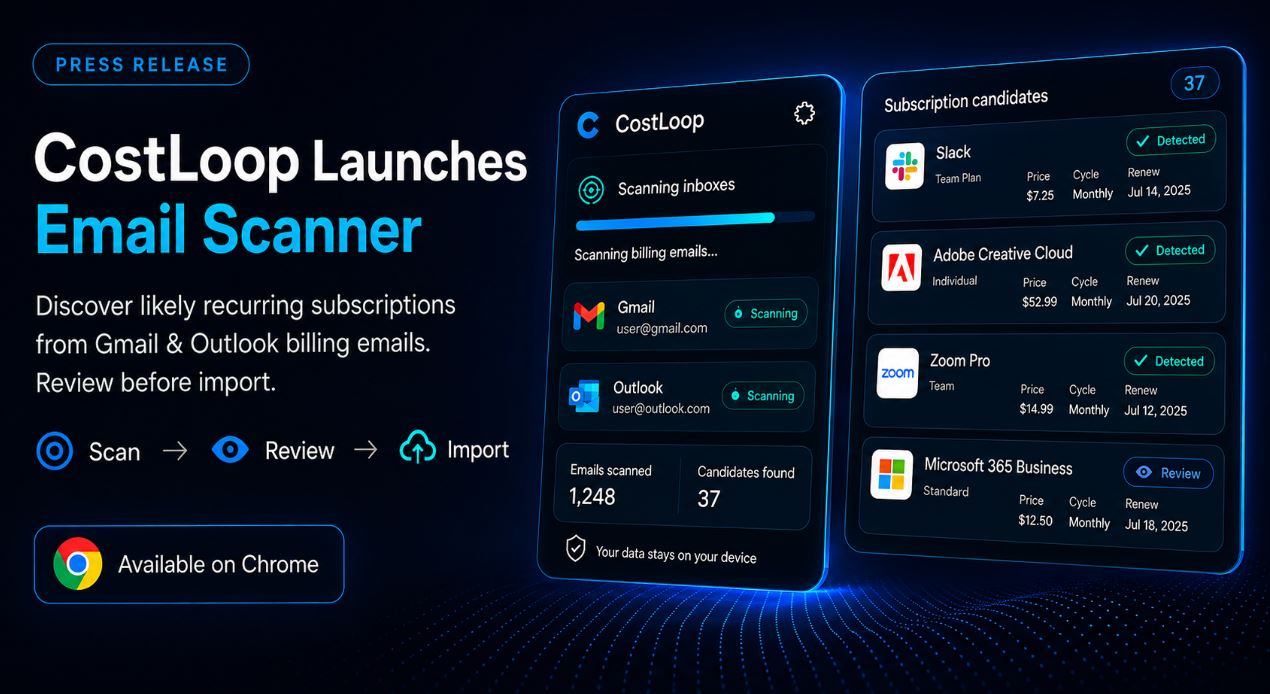
Receipts, invoices, renewal notices and payment confirmations are often distributed across months of email activity. CostLoop’s Email Scanner reviews billing messages from up to the previous 12 months and groups relevant information into likely subscription candidates.
Users can then review detected information before deciding what should be added to their CostLoop account.
The scanner is available through the Chrome Web Store:
A Review-First Approach to Subscription Discovery
Rather than automatically converting every detected billing message into a subscription record, CostLoop uses a review-first workflow:
Scan → Review → Import
Detected candidates may contain information such as the service or vendor name, price, billing currency, billing cycle and renewal date when that information can be identified from the relevant billing message.
Users can review and correct uncertain information and select which subscriptions they want to import.
The review step is designed around the limitations of email-based subscription detection. Billing messages are not standardized, a one-time purchase may sometimes resemble a recurring payment, and older receipts may represent subscriptions that are no longer active.
CostLoop therefore treats scanner results as candidates rather than guaranteeing that every detected item is an active subscription.
A detailed explanation of the scanner and its limitations is available in CostLoop’s current guide:
https://costloop.app/blog/manage-my-subscriptions-email-scanner/
Subscription Discovery Without Connecting a Bank Account
The Email Scanner provides another way to discover recurring expenses without requiring users to connect a bank or payment card account.
Email and financial statements provide different types of information. Bank and card statements can confirm that a transaction took place, while billing emails may provide additional context such as service names, billing cycles, plan information and renewal details.
CostLoop recommends reviewing additional sources such as bank statements, app-store subscriptions, PayPal automatic payments and older email accounts when conducting a complete subscription audit.
“Subscription management starts with discovery,” said Milosh Mladenovski, founder of CostLoop. “A dashboard can only help with subscriptions that actually make it into the dashboard. We built the scanner to reduce the manual work involved in finding billing emails, while keeping the user in control of what is ultimately imported.”
Gmail and Outlook Privacy Controls
CostLoop uses authorized read-only access for Gmail and Outlook scanning.
During the initial identification process, the scanner reviews information including sender address, subject line, date and provider message ID. When a message is identified as a likely billing or subscription email, its text or HTML content may be processed to identify relevant subscription information.
According to CostLoop’s current Privacy Policy, raw email text is not uploaded when a subscription is imported. Instead, only derived subscription fields selected for import are transmitted to CostLoop. Ordinary file attachments such as PDFs, images and other binary files are not requested or read by the scanner.
CostLoop’s complete privacy disclosures and current email-scanner information are available at:
https://costloop.app/privacy-policy/
Watch the CostLoop Email Scanner Walkthrough
CostLoop has also published a video walkthrough demonstrating how the browser extension works, including the scanner workflow and subscription-review process.
The walkthrough is available on YouTube:
https://www.youtube.com/watch?v=pVTDDzy6y8A
The CostLoop Email Scanner is currently available for installation from the Chrome Web Store.
About CostLoop
CostLoop is a subscription and recurring-cost management platform designed for freelancers, startups, small and medium businesses, and teams.
The platform helps users organize software subscriptions and recurring expenses, including costs, billing cycles, renewal dates, owners, invoices, document links and cancellation information.
More information about CostLoop:
CostLoop features:
https://costloop.app/features/
Current plans and pricing:
Email Scanner guide:
https://costloop.app/blog/manage-my-subscriptions-email-scanner/
Chrome Web Store:
YouTube walkthrough:
https://www.youtube.com/watch?v=pVTDDzy6y8A
Media Contact
Milosh Mladenovski
Founder, CostLoop
Website: https://costloop.app/